Copy Code Box Pro WordPress Plugin Documentation (Beginner’s Guide)

Copy Code Box Pro is a lightweight and powerful WordPress plugin that allows you to display clean, syntax-highlighted code snippets with a one-click Copy Code button. It is designed for developers, bloggers, instructors, and documentation sites that regularly publish code tutorials or technical content.

The plugin ensures your code is easy to read, professionally formatted, and instantly copyable — helping your users learn faster and reducing formatting errors.

Key Features

✅ Create unlimited code boxes

WhatsApp Channel Join Now
Telegram Channel Join Now

✅ Syntax highlighting (PrismJS powered)

✅ One-click “Copy Code” button

✅ Shortcode support for embedding

✅ Clean, responsive UI

✅ Secure output & safe escaping

✅ Admin dashboard for managing code

✅ Bulk delete & confirmation prompts

✅ Lightweight & performance-optimized

✅ Works with all major themes & builders

RequirementMinimum
WordPress Version6.0+
PHP Version7.4+
User RoleAdministrator
HTTPSRecommended

Installation Guide

Install via WordPress Upload

Install via WordPress Upload

  1. Log in to your WordPress Admin Panel
  2. Go to Plugins → Add New → Upload Plugin
  3. Select your plugin ZIP file
  4. Click Install Now
  5. Click Activate Plugin

That’s it — you’re ready to use it 🎉

Getting Started

Once activated, you will see a new menu item:
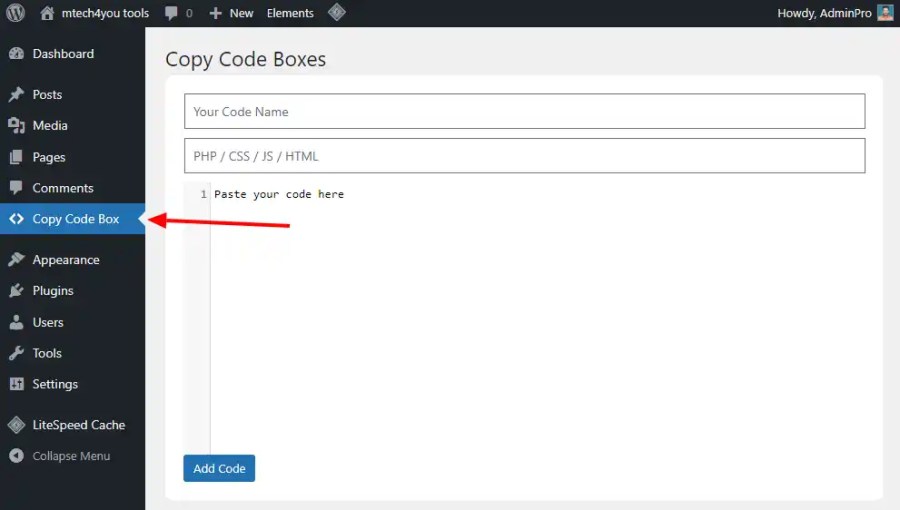
Copy code box admin menu option
Copy Code Box Menu Option

From here you can:

  • Create new snippets
  • Edit existing snippets
  • Delete code boxes
  • View shortcode IDs
  • Bulk delete existing snippets

Creating a New Code Box
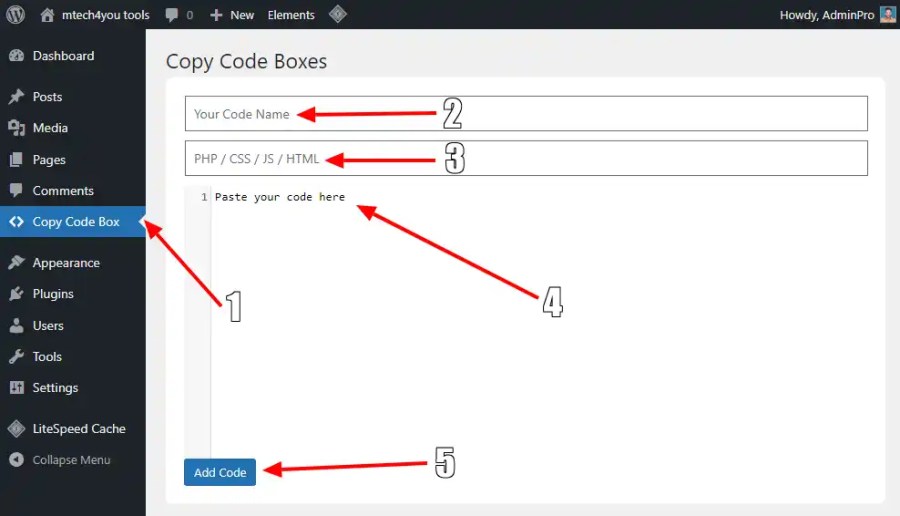
Creating a New Code Box

  1. Go to Copy Code Box
  2. Enter a Title
  3. Enter the Programming Language label
  4. Paste your code into the editor box
  5. Click Add Code

Your code snippet has been successfully stored in the system.

Inserting Code Into Posts & Pages

Each code box has a unique ID

Inserting Code Into Posts & Pages

Paste it anywhere inside:

  • Posts
  • Pages
  • Gutenberg blocks
  • Classic editor
  • Page builders
  • Custom post types
  Copy Code Box FREE Plugin Documentation (Beginner’s Guide)

The formatted code box will appear on the frontend automatically.

Frontend Display

Each embedded snippet includes:

  • A syntax-highlighted code block
  • A Copy Code button
  • A language label header
  • A Responsive Copy Code Box

When the user clicks Copy, the full code snippet is copied to their clipboard instantly.

No formatting breaks.

No hidden characters.

No confusion.

Managing Existing Code Boxes

Navigate to: Copy Code Box


From here you can:

  • Edit code
  • Rename title
  • Change language
  • Delete items
  • Bulk delete entries
  • View available shortcode IDs
  • All updates happen instantly.

Security & Sanitization

Copy Code Box Pro follows WordPress coding standards, including:

✅ Nonce verification

✅ Permission checks

✅ Escaped output

✅ Safe database operations

Your code is stored securely inside WordPress.

Performance Notes

  • Lightweight & optimized
  • Loads scripts only when needed
  • Works well on high-traffic sites
  • Zero unnecessary bloat

This plugin is designed to be as invisible — and efficient — as possible.

Styling & Appearance

The plugin includes:

  • Modern, developer-friendly styling
  • Syntax highlighting
  • Mobile-friendly layout
  • Clean typography

The look is intentionally minimal, so it blends well with any theme.

Use-Case Examples

This plugin is perfect for:

  • Programming tutorials
  • Developer blogs
  • SaaS documentation
  • Knowledge base sites
  • Technical training content
  • Support articles
  • API examples
  • Theme & plugin demos

If your users copy code —

This plugin improves their experience.

Best Practices

To get the most out of this plugin:

✅ Use clear titles for each snippet

✅ Keep code blocks focused

✅ Group-related snippets

✅ Add explanation text around code

✅ Avoid unnecessary inline styling

Your content stays clean — and helpful.

Compatibility

Tested with:

  • Gutenberg
  • Classic Editor
  • Elementor
  • Divi
  • WPBakery
  • Oxygen
  • Kadence
  • Astra
  • GeneratePress
  Copy Code Box FREE Plugin Documentation (Beginner’s Guide)

And most modern WordPress environments.

Uninstalling The Plugin

If you uninstall the plugin:

  • Code boxes will no longer output
  • Stored snippets may be removed depending on settings

Always back up your site first.

Frequently Asked Questions

Do I need coding knowledge?

No — everything is point-and-click.

Will it slow down my site?

No, it is extremely lightweight.

Does it work on mobile?

Yes — fully responsive.

Can users copy code instantly?

Yes — one click copies the entire snippet.

Does it support unlimited snippets?

Yes.

Does it support page builders?

Yes — anywhere shortcodes work.

Is it safe?

Yes — output is properly escaped.

Support & Updates

Your license includes:

  • Lifetime updates
  • Premium support
  • Bug fixes and enhancements

For assistance, contact support through your account dashboard.

Copy Code Box Pro gives your tutorials and documentation a professional edge — making code easier to read, easier to copy, and easier to learn from. It improves user experience without adding complexity or performance overhead.

If you publish code online, this plugin becomes one of the simplest — and most valuable — tools in your workflow.

Affiliate Disclosure: Some links in this article may be affiliate links. If you use them, we may earn a small commission at no extra cost to you. This helps support our blog and content. Read full disclosure

Discover more from MTECH4YOU BLOG

Subscribe to get the latest posts sent to your email.

Was this article helpful?
YesNo
Vijay Joshi's avatar

I am a Senior WordPress (CMS) Website Designer and Digital Marketing Expert with over 9 years of experience, having successfully delivered more than 500 websites to clients.

Leave a Comment

Discover more from MTECH4YOU BLOG

Subscribe now to keep reading and get access to the full archive.

Continue reading