
Complete Plugin Features List
Copy Code Box Pro is one of the best WordPress code snippet plugins you can install. It’s fast, simple, secure, and built to deliver the perfect balance of design and usability — without bloat.


If you publish tutorials, developer guides, or technical blogs, you already know the struggle: pasting code inside WordPress often looks messy, hard to read, and difficult for users to copy correctly. That’s exactly why Copy Code Box Pro — WordPress Code Snippet & Copy Button Plugin was built.
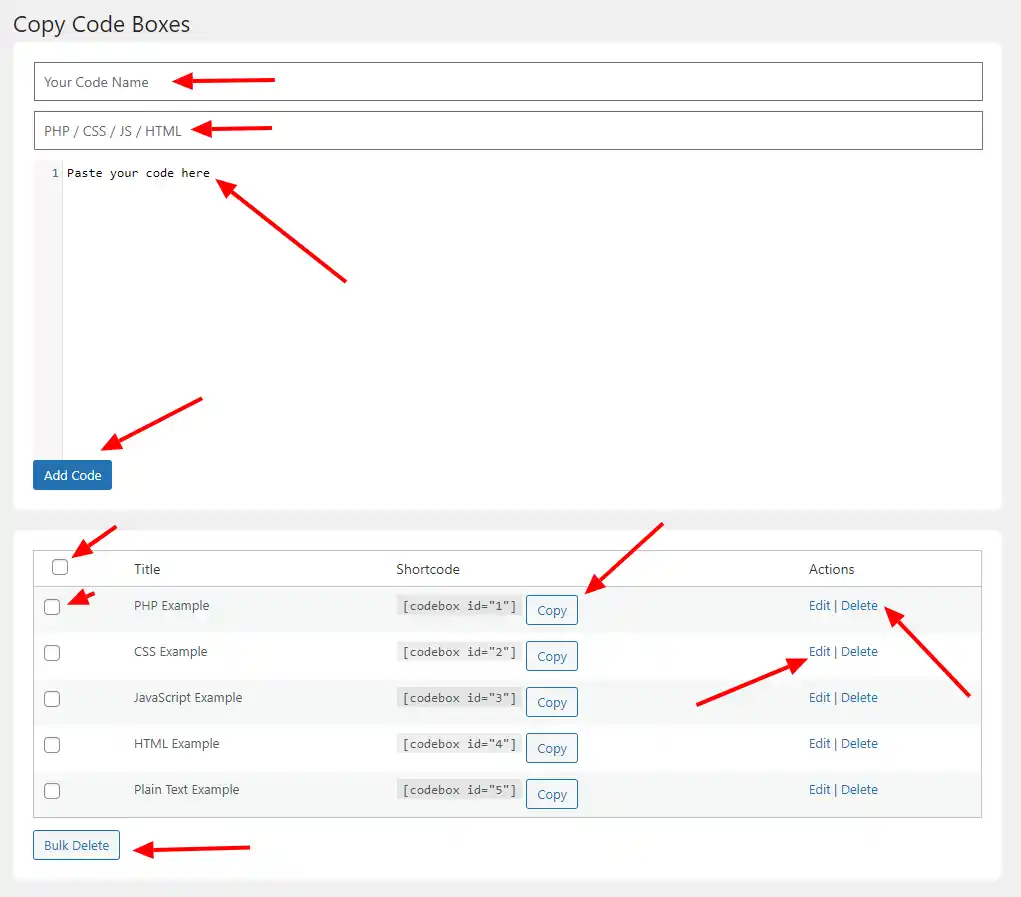
This lightweight and powerful WordPress code box plugin lets you display beautiful, syntax-highlighted code snippets with a one-click Copy Code button. No formatting issues. No broken code. No extra work.
Designed for bloggers, developers, agencies, and WordPress tutorial websites, this plugin delivers a clean, professional look that builds trust with your readers — while making your content easier to use and share.
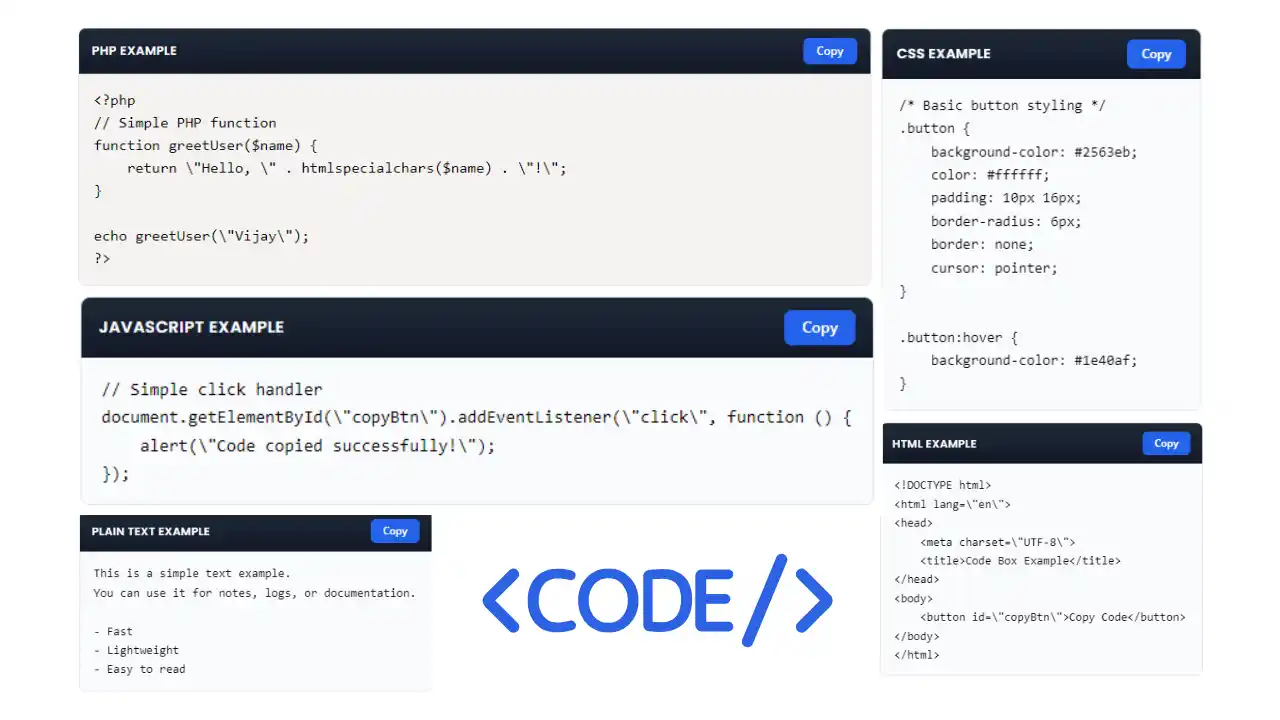
With syntax highlighting, modern UI styling, instant copy to clipboard, shortcode support, admin-side editor tools, and super-fast performance, this plugin gives you everything you need to present code the right way.
If you’ve been searching for a copy code plugin for WordPress that’s easy to use, SEO-friendly, lightweight, and reliable, you just found it.
Make your tutorials stand out. Help users copy code in one click.
And upgrade your site into a true developer-friendly resource.
Copy Code Box Pro is one of the best WordPress code snippet plugins you can install. It’s fast, simple, secure, and built to deliver the perfect balance of design and usability — without bloat.
📌 Create unlimited code boxes
🧾 Shortcode support — [codebox id="1"]
🎨 Syntax highlighting (PrismJS powered)
📋 One-click “Copy Code” button
🧠 Auto language label display
🛡️ Secure, clean code — no risk output
⚡ Super-lightweight, fast loading
📱 Responsive & mobile friendly
✅ Simple shortcode embed
✅ Works in posts, pages, builders, blocks
✅ Graceful fallback if invalid ID
✅ Clean markup output
✅ Add / edit / delete code snippets
✅ Bulk delete support
✅ CodeMirror admin editor
✅ Confirmation popups for actions
✅ Organized table listing
✅ Auto ID generation
✅ Stored safely using WordPress options
✅ Beautiful modern code box UI
✅ Copy button with instant action
✅ Language label header
✅ Consistent formatting
✅ Professional developer-style look
Copy Code Box Pro is a lightweight WordPress plugin that lets you add beautiful, syntax-highlighted code boxes with a one-click Copy button. Perfect for tutorials, developer blogs, and documentation—clean, fast, and professional.
This plugin is best for websites that share code tutorials, developer guides, technical documentation, and coding examples — helping readers copy clean, error-free code in one click.
DocumentationExplore more powerful tools: Hosting Recommender Pro helps users choose the best hosting, WP Code Inserter Pro adds custom code safely, and WP Download Timer Pro boosts engagement with timed downloads. Upgrade your toolkit today!

Using Copy Code Box Pro instantly makes your tutorials easier to follow and far more professional. Clean, readable, copy-ready code builds trust and authority with your audience, while preventing formatting issues that normally break snippets or confuse users. Your readers enjoy a better user experience, which naturally boosts engagement, sharing, and return visits. Because the plugin is lightweight, it won’t slow down your website — and you stay in full control of every snippet you publish. Whether you run a developer blog, tutorial site, or technical resource hub, this plugin delivers a polished, professional look without effort. It’s not just another UI add-on — it’s a genuine reader-experience upgrade.
If you regularly publish code, tutorials, or technical content, this plugin is built exactly for you. It helps your readers understand, copy, and use your code effortlessly — while giving your website a polished, pro-developer edge. Whether you teach, build, write, or run documentation, Copy Code Box Pro fits perfectly into your workflow.
✅ WordPress bloggers who share tips & tutorials
✅ Developer tutorial & coding education websites
✅ Coding instructors & trainers
✅ SaaS product documentation pages
✅ Knowledge base & help centre sites
✅ Technical writers & content creators
✅ Agencies & freelance developers
✅ Theme & plugin creators showcasing examples
If your audience needs to see and copy code clearly,
This plugin is made for you.
It adds beautiful, copy-ready code boxes with syntax highlighting to WordPress.
Yes — it’s built for speed and clean performance.
No — everything works via a simple dashboard.
Not at all. It’s optimized and minimal.
Yes — create as many as you want.
Yes, just paste [codebox id="X"].
Yes, PrismJS powers the highlighting.
Yes — works everywhere shortcodes work.
Yes — the Copy Code button handles it instantly.
Absolutely — output is safely escaped.
Yes — the layout is responsive.
Yes — edit anytime from dashboard.
Yes — simply select or label the language.
Yes — premium email support is provided.
Yes — lifetime updates included.
Yes — seamlessly.
Only allowed roles with permissions.
100% yes.
No — it’s fully standalone.
Purchase from our website and download instantly.
If you’re serious about publishing professional code tutorials, clean documentation, or developer resources, Copy Code Box Pro is one of the best WordPress code snippet plugins you can install. It’s fast, simple, secure, and built to deliver the perfect balance of design and usability — without bloat.
Your readers get clean, readable code.
You get fewer support questions and happier users.
Upgrade your tutorials today — and make copying code effortless.